
What Is IPTV? How Internet TV Works
INTRODUCTION
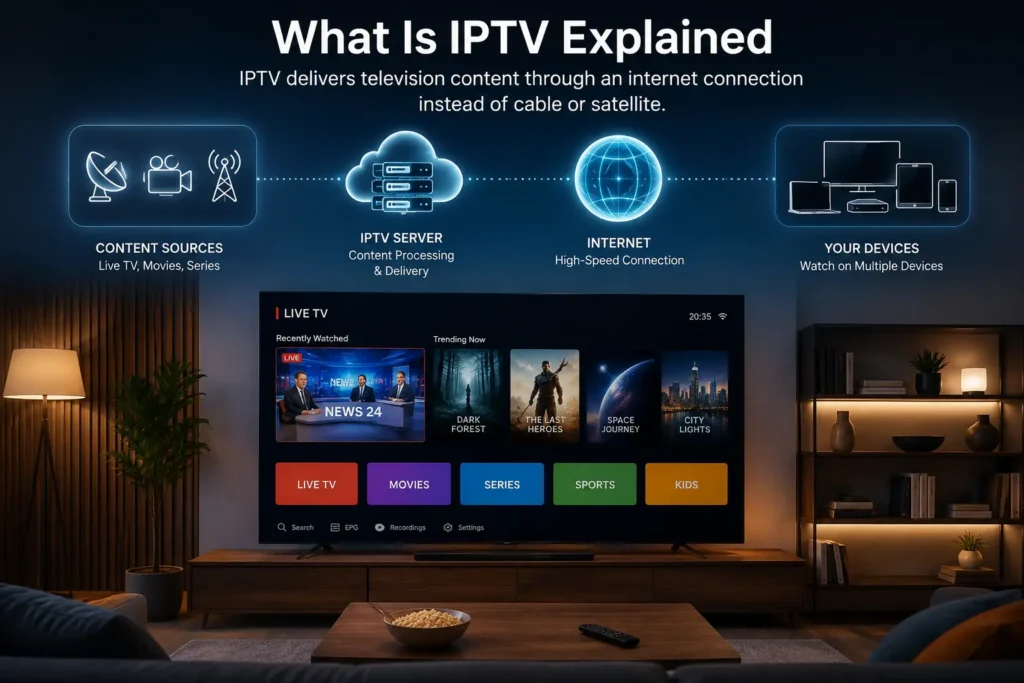
IPTV stands for Internet Protocol Television. Instead of receiving channels through a satellite dish, cable line, or antenna, IPTV delivers television content through your internet connection. If you have ever watched Netflix, YouTube TV, or a live sports stream through an app on your Smart TV, you have already used the same underlying technology that powers IPTV.
This guide explains what IPTV actually is, how the technology works behind the scenes, what equipment you need, and how it compares to traditional TV. It is written for anyone who has heard the term but wants a clear, non-technical explanation before deciding whether it fits their setup.
QUICK ANSWER
IPTV (Internet Protocol Television) is a method of delivering television content — live channels and on-demand video — over an internet connection instead of through traditional broadcast, cable, or satellite signals. Content is transmitted in small data packets using the same internet protocol that powers websites and streaming apps, then decoded and displayed on a TV, streaming device, or app in real time.
KEY TAKEAWAYS
IPTV delivers TV content through your internet connection rather than a satellite, antenna, or cable line.
It works using data streaming technology, similar to how Netflix or YouTube deliver video.
IPTV can include live channels, video on demand (VOD), and catch-up TV.
A stable broadband connection is essential — video quality depends directly on internet speed and stability.
IPTV can be watched on Smart TVs, streaming boxes, phones, tablets, and computers using dedicated apps.
Not all IPTV services are the same — legitimate, licensed services differ from unauthorized ones, and this distinction matters legally.
TABLE OF CONTENTS
What Does IPTV Mean
How IPTV Actually Works
IPTV vs Cable and Satellite TV
Types of IPTV Services
What You Need to Use IPTV
Devices That Support IPTV
How IPTV Content Is Delivered (M3U and EPG Explained)
Internet Requirements for Smooth IPTV Streaming
Common IPTV Streaming Issues
Is IPTV Legal
Choosing an IPTV Service Responsibly
Frequently Asked Questions
WHAT DOES IPTV MEAN
IPTV stands for Internet Protocol Television. The “Internet Protocol” part refers to the same networking standard used to send data across the internet — the same system that loads a webpage or delivers a video call. Instead of broadcasting a signal over the air or through a coaxial cable, IPTV breaks video into data packets and sends them over an IP network to your device.
This is fundamentally different from traditional broadcast TV, which transmits a continuous analog or digital signal to every household simultaneously, regardless of whether anyone is watching. IPTV, by contrast, typically streams content on demand or through managed live streams, which allows for more flexibility, interactivity, and device compatibility.
HOW IPTV ACTUALLY WORKS
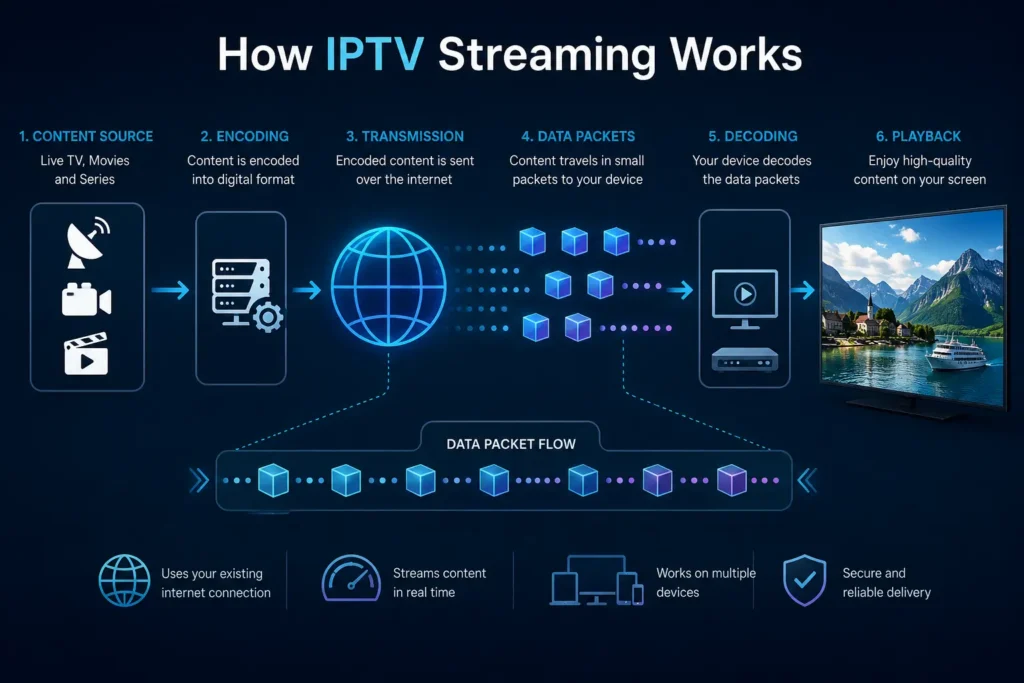
At a technical level, IPTV involves a few consistent steps, whether you’re watching a live channel or an on-demand movie.
- Source content is captured or ingested. Live channels are captured from broadcast feeds, while VOD content is stored on servers.
- The video is encoded and compressed. Raw video files are large, so they are compressed using codecs such as H.264 or H.265 (HEVC) to reduce file size while preserving quality.
- Content is packaged into IP data streams. The compressed video is broken into small data packets suitable for transmission over the internet.
- Packets travel over the internet to your device. This can happen through your home broadband connection, mobile network, or a managed private network, depending on the provider.
- Your device decodes and displays the stream. An IPTV app, Smart TV interface, or streaming box receives the incoming packets, decodes them, and reconstructs the video in real time.
This entire process typically happens with only a short delay, which is why live IPTV can feel nearly identical to watching a normal broadcast, provided the internet connection is stable.
IPTV VS CABLE AND SATELLITE TV
The core difference comes down to how the signal reaches your screen.
Cable TV sends a signal through a physical coaxial cable directly to your home, delivered by a regional provider with fixed infrastructure.
Satellite TV broadcasts a signal from an orbiting satellite to a dish installed at your home, requiring a clear line of sight to the sky.
IPTV sends content as internet data, meaning it works anywhere you have a sufficiently fast and stable internet connection — no dish, no dedicated cable line, and no regional broadcast tower required.
This difference is also why IPTV tends to offer more flexibility: content can often be accessed on multiple devices, paused, resumed, or viewed on demand, whereas traditional broadcast TV is generally tied to a fixed schedule and a single connected television.
TYPES OF IPTV SERVICES
IPTV is a broad technology category, and it’s used in several different contexts:
Live TV streaming — channels delivered continuously, similar to traditional broadcast but over IP.
Video on Demand (VOD) — a library of movies and shows that users can watch at any time, similar to Netflix.
Catch-up TV — recently aired programs made available for a limited time after their original broadcast.
Time-shifted TV — allows pausing, rewinding, or restarting live content.
Some well-known streaming platforms use IPTV-style technology internally, even though they aren’t always labeled as “IPTV” in marketing. The term is most commonly used, however, to describe services that focus specifically on delivering live television channel packages over the internet.
WHAT YOU NEED TO USE IPTV
To watch IPTV content, you generally need:
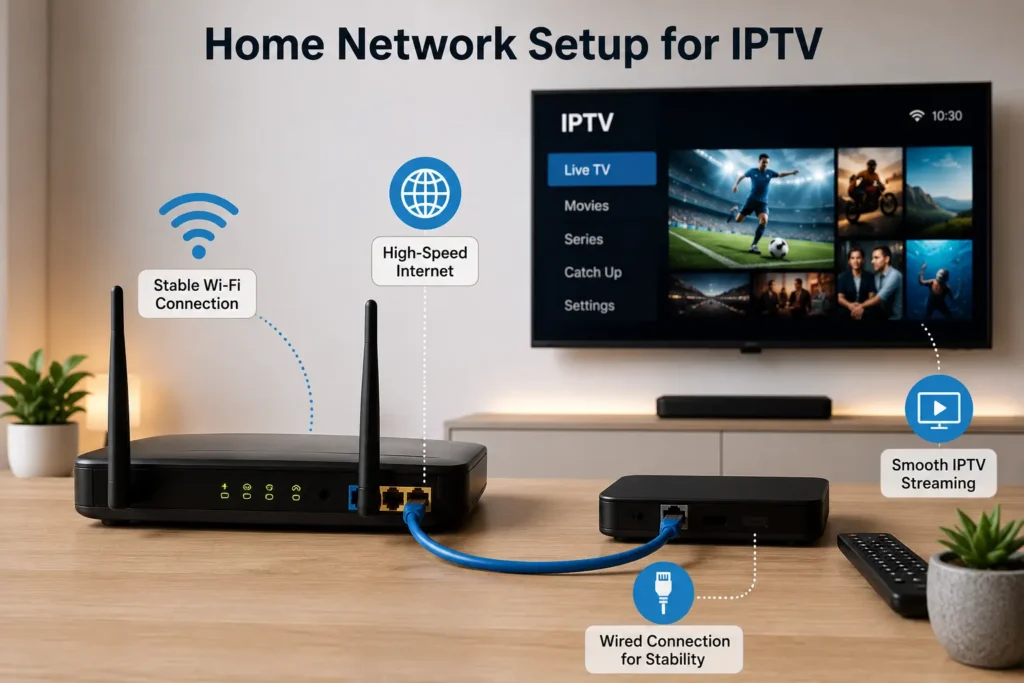
A stable broadband internet connection (wired or Wi-Fi)
A compatible device — Smart TV, streaming box, phone, tablet, or computer
An IPTV application or player installed on that device
A valid subscription or content source, depending on the service
A playlist or login credentials provided by the service, used to load available channels and content
The setup process varies slightly by device, but the underlying requirement is always the same: a reliable internet connection paired with a compatible app.
DEVICES THAT SUPPORT IPTV
IPTV apps are available across most modern streaming ecosystems, including:
Smart TVs, including Samsung and LG models running their respective smart platforms
Android TV and Google TV devices
Amazon Fire TV Stick and Fire TV devices
Apple TV
Dedicated Android IPTV boxes
Smartphones and tablets (iOS and Android)
Computers, through browser-based or desktop IPTV players
Compatibility depends on the specific app used, since not every IPTV player is available on every platform. Checking whether a preferred app is supported on your exact device model is an important first step before subscribing to any service. [REQUIRES VERIFICATION for specific app-to-device compatibility, as this changes frequently.]
HOW IPTV CONTENT IS DELIVERED (M3U AND EPG EXPLAINED)
Two terms come up frequently when discussing IPTV setup:
M3U playlist — a simple text file that lists the streaming URLs for available channels. IPTV apps read this file to know which channels to display and how to access them.
EPG (Electronic Program Guide) — the on-screen schedule showing what’s airing now and what’s coming up next, similar to the guide you’d see on a traditional cable box. Not all IPTV setups include an EPG, but it significantly improves the viewing experience when available.
Understanding these two components helps explain why some IPTV apps require you to “load a playlist” or “add an EPG source” during setup — they are essentially telling the app where to find the channel data and schedule information.
INTERNET REQUIREMENTS FOR SMOOTH IPTV STREAMING
Because IPTV depends entirely on your internet connection, speed and stability directly affect viewing quality. As a general guideline:
Standard Definition (SD): roughly 3–5 Mbps
High Definition (HD): roughly 8–12 Mbps
4K streaming: roughly 25 Mbps or higher
These figures are general industry guidelines rather than fixed rules, and actual requirements vary by provider and compression method used. [REQUIRES VERIFICATION for provider-specific bandwidth requirements.]
Beyond raw speed, connection stability matters just as much. A wired Ethernet connection generally provides more consistent streaming than Wi-Fi, especially in homes with multiple connected devices or Wi-Fi interference. High latency, jitter, or packet loss can cause buffering even when overall internet speed appears sufficient.
COMMON IPTV STREAMING ISSUES
Most IPTV playback problems fall into a few recognizable categories:
Buffering or freezing — often caused by insufficient bandwidth, network congestion, or an overloaded Wi-Fi router.
Poor picture quality — can result from a weak connection, an outdated app version, or a device that isn’t powerful enough to decode higher resolutions smoothly.
App crashes — frequently linked to outdated software, insufficient device storage, or incompatible firmware.
Channels not loading — usually related to an outdated playlist, expired credentials, or a temporary server issue.
Restarting the router, switching from Wi-Fi to Ethernet, closing background apps, and keeping the IPTV app updated resolve the majority of everyday playback issues.
IS IPTV LEGAL
IPTV, as a technology, is completely legal. It is simply a method of transmitting video over the internet, the same underlying technology used by licensed streaming platforms worldwide.
What determines legality is not the technology itself, but whether the specific service delivering the content has the proper rights and licensing to distribute that content. Services that redistribute copyrighted broadcasts without authorization operate outside the law, regardless of the technology used to deliver them.
When evaluating any IPTV provider, it’s worth considering whether the service is transparent about its content sourcing and licensing. This article does not provide legal advice, and specific legal questions about content rights should be directed to a qualified professional or verified through official sources in your country. [REQUIRES VERIFICATION for jurisdiction-specific regulations.]
CHOOSING AN IPTV SERVICE RESPONSIBLY
If you’re evaluating IPTV providers, a few practical checks help separate reliable services from questionable ones:
Look for clear, accessible customer support
Check for transparent pricing without hidden terms
Confirm compatibility with your specific device before subscribing
Review the provider’s privacy policy and data handling practices
Be cautious of services making unrealistic guarantees, such as claiming every possible channel worldwide for an unusually low price
Taking a few minutes to verify these details before subscribing helps avoid both technical disappointment and potential security risks, such as apps requesting excessive permissions or containing malware.
CONCLUSION
IPTV is, at its core, a straightforward concept: television delivered through the internet instead of cable, satellite, or broadcast signals. Understanding how it works — from encoding and packet delivery to the role of playlists and EPGs — makes it much easier to set up, troubleshoot, and get consistent performance from any IPTV app or device.
The technology itself is neutral and legal; what matters most is the internet connection powering it and the legitimacy of the service providing the content. For anyone new to IPTV, starting with a stable wired connection, a compatible device, and realistic expectations about bandwidth will make the biggest difference in overall streaming quality.
If you’re setting up IPTV for the first time, the Kemo IPTV tutorials section walks through device-specific installation steps in more detail.
FAQ
What is the difference between IPTV and streaming apps like Netflix?
Both use similar underlying technology to deliver video over the internet. The main difference is content focus: Netflix is primarily on-demand entertainment, while IPTV services often emphasize live TV channels alongside on-demand libraries, closer to a traditional channel-based viewing experience.
Do I need a special box to watch IPTV?
Not necessarily. IPTV can be watched through apps on Smart TVs, streaming sticks, phones, tablets, or computers. A dedicated box isn’t required, though some users prefer one for a more traditional TV-like interface.
How much internet speed do I need for IPTV?
It depends on resolution. SD typically needs around 3–5 Mbps, HD around 8–12 Mbps, and 4K around 25 Mbps or higher, though actual requirements vary by provider and compression method.
Why does my IPTV keep buffering?
Buffering is usually caused by insufficient internet speed, network congestion, weak Wi-Fi signal, or an overloaded router. Switching to a wired Ethernet connection often resolves persistent buffering.
Can I use IPTV on multiple devices at once?
This depends entirely on the subscription and provider, since some plans limit the number of simultaneous connections. Check your specific service’s terms for exact limits. [REQUIRES VERIFICATION]
Is IPTV the same as illegal streaming?
No. IPTV is a delivery technology, not a legal category. Legality depends on whether the specific service has proper rights to distribute the content it offers, not on the technology used to stream it.
What does M3U mean in IPTV?
M3U is a playlist file format that lists the streaming links for available channels. IPTV apps use this file to load and organize channels for playback.
What is an EPG in IPTV?
EPG stands for Electronic Program Guide — the on-screen schedule showing current and upcoming programs, similar to a traditional cable TV guide.
Does IPTV work on Wi-Fi, or do I need Ethernet?
IPTV works over Wi-Fi, but a wired Ethernet connection generally provides more stable performance, especially for HD or 4K streaming in homes with multiple connected devices.
Can weather or network outages affect IPTV?
Since IPTV depends on internet connectivity rather than satellite signal, it isn’t affected by weather in the way satellite TV can be. However, any internet outage or ISP disruption will interrupt IPTV service.
“Kemo IPTV tutorials” → https://iptvsverige-4k.net/tutorials/ (used in conclusion, contextually relevant for setup guidance)
“IPTV subscription options” → https://iptvsverige-4k.net/iptv-subscription/ (optional, only if a natural commercial mention is desired near the conclusion)
“Frequently asked questions” → https://iptvsverige-4k.net/faq/ (optional, if linking to a broader site FAQ makes sense alongside this article’s FAQ)