
IPTV vs Cable, Satellite, and Streaming Services
INTRODUCTION
Choosing how to watch television now means choosing between several fundamentally different delivery systems. Cable and satellite have existed for decades, streaming platforms like Netflix reshaped viewing habits over the past ten years, and IPTV sits in an interesting middle ground — using internet delivery like streaming, but often structured around live channels like cable.
This article breaks down how each option actually works, where they overlap, and where they genuinely differ, so you can understand what you’re comparing before choosing a viewing setup.
QUICK ANSWER
IPTV, cable, satellite, and streaming services all deliver television, but through different infrastructure. Cable uses physical coaxial lines, satellite uses a dish and orbital signal, streaming platforms deliver on-demand content through internet apps, and IPTV delivers live channels and on-demand content as internet data, often combining the channel-based structure of cable with the flexibility of streaming.
KEY TAKEAWAYS
Cable and satellite rely on dedicated broadcast infrastructure; IPTV and streaming rely on internet data.
IPTV typically focuses on live channel packages, while most streaming platforms emphasize on-demand libraries.
Satellite requires a physical dish and clear sky access; IPTV and cable do not.
IPTV generally offers more device flexibility than cable or satellite, since it works on internet-connected devices.
Picture quality on IPTV depends on internet stability, while cable and satellite quality depends on signal strength.
The right choice depends on viewing habits, available infrastructure, and device preferences — not a single “best” option.
TABLE OF CONTENTS
How Each Delivery Method Works
IPTV vs Cable TV
IPTV vs Satellite TV
IPTV vs Streaming Platforms
Key Differences at a Glance
Picture Quality Comparison
Cost and Contract Considerations
Device Compatibility Comparison
Reliability and Common Issues
Which Option Fits Different Viewing Habits
Frequently Asked Questions
HOW EACH DELIVERY METHOD WORKS
Before comparing them directly, it helps to understand what’s physically happening with each technology.
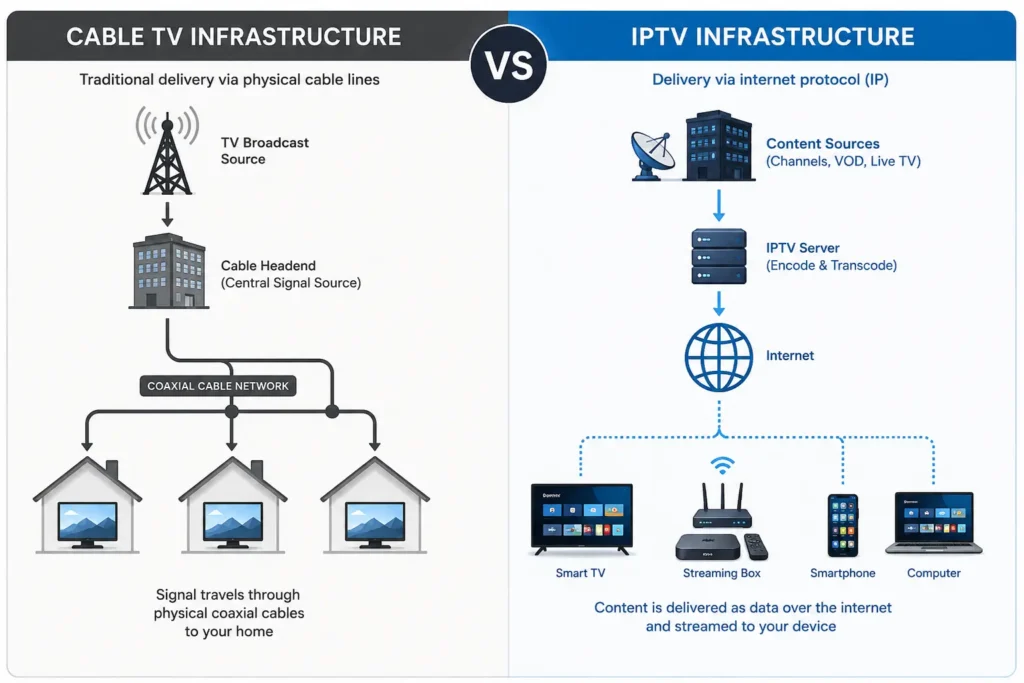
Cable TV transmits signals through a coaxial cable installed by a regional provider. The signal travels through fixed physical infrastructure directly to a cable box in your home.
Satellite TV broadcasts a signal from an orbiting satellite to a dish mounted at your property. The dish must have a clear line of sight to the sky, and the signal is converted into a viewable format by a satellite receiver.
Streaming platforms deliver video through internet apps, typically built around on-demand libraries rather than live linear channels. Content is requested by the user and streamed individually, rather than broadcast continuously.
IPTV delivers content — often live channels alongside on-demand libraries — as internet data packets, decoded in real time by an app or device. It uses the same general streaming technology as platforms like Netflix, but is frequently structured to replicate a traditional channel-based viewing experience.
IPTV VS CABLE TV
Cable has been the standard for live TV for decades, and it still offers a few structural advantages: a dedicated physical connection generally means more predictable performance, since it isn’t affected by home internet congestion.
IPTV, by comparison, depends entirely on the quality of your internet connection. When that connection is strong and stable, IPTV can match or exceed cable in flexibility, since it works across multiple device types without requiring a dedicated cable box for each TV.
Where the two most clearly diverge:
Infrastructure: Cable requires a physical line installed by a provider; IPTV only requires existing internet access.
Flexibility: IPTV apps can typically run on phones, tablets, and multiple Smart TVs; cable usually requires a separate box per television.
Installation: Cable installation often requires a technician visit; IPTV setup is usually self-managed through an app.
Contracts: Cable providers commonly involve fixed regional contracts; IPTV services vary by provider but are often more flexible.
IPTV VS SATELLITE TV
Satellite TV’s biggest structural requirement is a clear line of sight to the sky, which makes it unsuitable for some apartments, heavily wooded areas, or locations with obstructed views. It’s also more susceptible to signal interruption during severe weather.
IPTV has no line-of-sight requirement at all, since it depends on internet infrastructure rather than orbital signal reception. This makes it more practical in urban apartments or locations where dish installation isn’t feasible.
Where they differ most:
Installation location: Satellite requires specific outdoor placement; IPTV requires none.
Weather sensitivity: Satellite signal can degrade during storms; IPTV is unaffected by weather but can be affected by internet outages.
Equipment: Satellite requires a dish and receiver; IPTV requires only a compatible device and internet connection.
Portability: IPTV can generally be used anywhere with sufficient internet; satellite is tied to a fixed installed dish.
IPTV VS STREAMING PLATFORMS
This is often the most confusing comparison, since IPTV and mainstream streaming platforms use similar underlying internet delivery technology.
The main distinction is content structure. Streaming platforms like Netflix or Disney+ are built primarily around on-demand libraries — you choose what to watch, when to watch it. IPTV services are frequently built around live channel packages, replicating a traditional “flip through channels” experience, often alongside an on-demand section.
Key differences:
Content structure: Streaming platforms emphasize on-demand catalogs; IPTV emphasizes live channel lineups.
Licensing model: Major streaming platforms hold direct content licensing agreements; IPTV services vary significantly in how they source and license content, and this should always be verified before subscribing. [REQUIRES VERIFICATION on a per-provider basis]
Interface: Streaming apps are typically built around browsing and recommendations; IPTV apps are typically built around channel numbers and program guides.
Live sports and events: IPTV services often prioritize live channel access, including sports; most mainstream streaming platforms have historically focused less on this, though this is changing. [REQUIRES VERIFICATION for current platform offerings]
KEY DIFFERENCES AT A GLANCE
Delivery method:
Cable — physical coaxial line
Satellite — dish and orbital signal
Streaming — internet, on-demand focus
IPTV — internet, live channel focus (with on-demand options)
Installation requirement:
Cable — technician-installed line
Satellite — outdoor dish with sky access
Streaming — none, app-based
IPTV — none, app-based
Primary content style:
Cable — live channels, fixed schedule
Satellite — live channels, fixed schedule
Streaming — on-demand library
IPTV — live channels plus on-demand
Device flexibility:
Cable — limited, box per TV
Satellite — limited, receiver per TV
Streaming — high, multi-device apps
IPTV — high, multi-device apps
PICTURE QUALITY COMPARISON
Picture quality depends on different variables for each delivery method.
Cable and satellite quality is primarily determined by signal strength and the provider’s broadcast standards, which are generally consistent as long as the connection is stable.
IPTV and streaming quality depend directly on internet speed and connection stability. A strong, stable broadband connection can deliver HD or 4K quality comparable to cable or satellite; a weak or congested connection will cause buffering or reduced resolution regardless of what the provider offers.
This is the single most important practical difference for viewers considering a switch to IPTV: your home internet becomes the determining factor for viewing quality, not just the service itself.
COST AND CONTRACT CONSIDERATIONS
Cable and satellite providers commonly involve regional pricing, equipment rental fees, and multi-year contracts with early termination penalties. [REQUIRES VERIFICATION for current regional pricing, as this varies significantly by provider and location.]
IPTV and streaming services are generally structured around simpler subscription models, often monthly or based on selected duration plans, without requiring long-term contracts or dedicated hardware rental. This tends to make switching providers considerably easier if a service doesn’t meet expectations.
DEVICE COMPATIBILITY COMPARISON
Cable and satellite typically require a dedicated receiver box connected to each television.
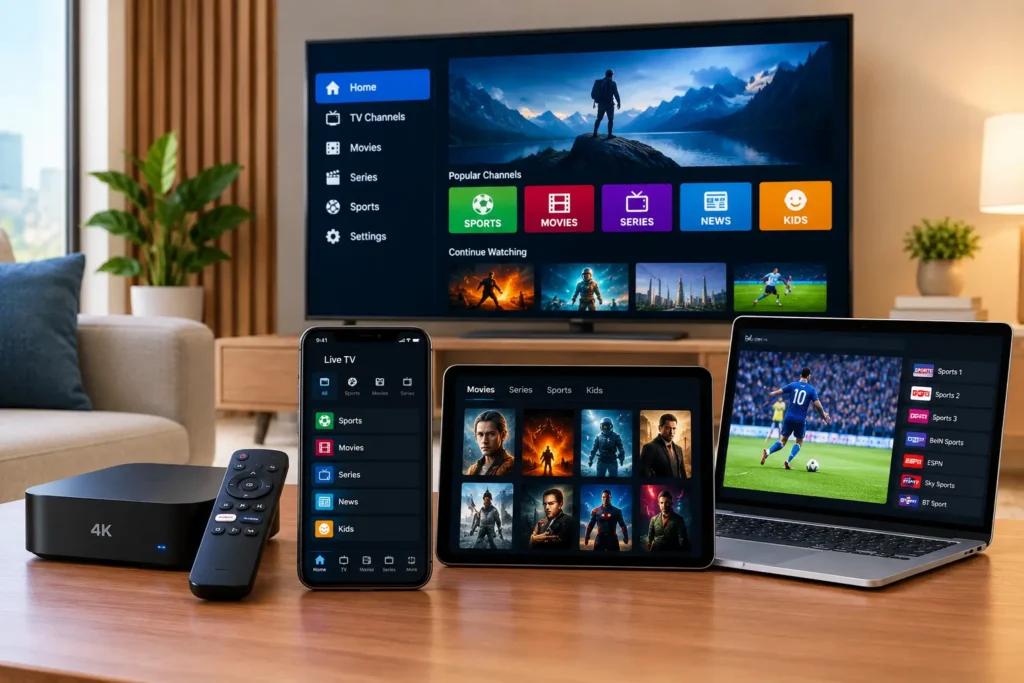
IPTV and streaming apps run on a much wider range of devices, including:
Smart TVs (Samsung, LG, and other major platforms)
Android TV and Google TV devices
Amazon Fire TV Stick and Fire TV
Apple TV
Smartphones and tablets
Computers via browser or desktop apps
This flexibility is one of the main reasons households increasingly consider IPTV or streaming as an alternative to fixed cable or satellite hardware.
RELIABILITY AND COMMON ISSUES
Each delivery method has its own typical failure points.
Cable: Signal loss during line damage or provider outages; generally stable otherwise.
Satellite: Weather-related interruptions, especially during heavy storms; signal loss from dish misalignment.
Streaming: Buffering during high-traffic periods or slow internet; occasional app-level bugs.
IPTV: Buffering or freezing tied directly to internet speed and stability; performance can vary more than cable or satellite if the home network isn’t optimized.
For IPTV specifically, a wired Ethernet connection and a router capable of handling sustained data streams significantly reduce the most common playback issues.
WHICH OPTION FITS DIFFERENT VIEWING HABITS
Rather than framing this as one option being universally “best,” it’s more useful to match the delivery method to viewing habits:
Households prioritizing live TV with minimal setup often lean toward cable, where infrastructure already exists.
Rural areas without reliable broadband sometimes rely on satellite, since it doesn’t depend on internet infrastructure.
Viewers who primarily watch on-demand content typically gravitate toward streaming platforms.
Viewers who want live channel access across multiple devices, without a technician-installed line, often consider IPTV — provided they have a stable, sufficiently fast internet connection.
The right fit depends less on which technology is “better” in the abstract and more on your internet infrastructure, device setup, and whether your viewing habits lean toward live channels or on-demand content.
CONCLUSION
IPTV, cable, satellite, and streaming services all solve the same basic problem — delivering television to a screen — but through meaningfully different infrastructure and content models. Cable and satellite depend on dedicated broadcast hardware, while IPTV and streaming depend on internet data, which shifts the responsibility for quality onto your home network.
For viewers with a stable, sufficiently fast internet connection, IPTV offers a practical middle ground: the live-channel structure of traditional TV combined with the device flexibility of modern streaming. For those exploring this option, the Kemo IPTV tutorials section covers device-specific setup in more detail.
FAQ
Is IPTV cheaper than cable or satellite?
IPTV subscriptions are often priced differently than traditional cable or satellite packages, generally without long-term contracts or equipment rental fees. Actual cost comparisons vary significantly by provider and region, so direct pricing should be checked individually. [REQUIRES VERIFICATION]
Do I need special equipment for IPTV?
No dedicated receiver box is required. IPTV works through an app installed on a Smart TV, streaming device, phone, or computer, along with a stable internet connection.
Does IPTV work without cable or satellite infrastructure?
Yes. IPTV only requires an internet connection — it doesn’t rely on coaxial cable lines or a satellite dish at all.
Why does my IPTV buffer more than my cable used to?
Buffering is usually tied to internet speed, network congestion, or Wi-Fi instability, since IPTV quality depends directly on your connection rather than a dedicated broadcast signal.
Can I watch IPTV on multiple TVs at once?
This depends on the specific provider and subscription plan, since some services limit simultaneous connections. Checking the exact terms of a service before subscribing is recommended. [REQUIRES VERIFICATION]
Is satellite TV better in rural areas than IPTV?
In areas with limited broadband access, satellite can be more reliable simply because it doesn’t depend on internet infrastructure. IPTV performance in rural areas depends entirely on local internet quality.
Do streaming platforms and IPTV use the same technology?
They use similar underlying internet streaming technology, but differ in content structure — streaming platforms emphasize on-demand libraries, while IPTV typically emphasizes live channel access.
Which option offers the most device flexibility?
IPTV and streaming platforms generally offer the widest device compatibility, since they run as apps across Smart TVs, streaming boxes, phones, tablets, and computers, rather than requiring dedicated hardware per television.
Does weather affect IPTV like it affects satellite?
No. IPTV isn’t affected by weather conditions the way satellite signal can be, since it doesn’t rely on a dish or line-of-sight reception. It can, however, be affected by internet outages.
“Kemo IPTV tutorials” → https://iptvsverige-4k.net/tutorials/ (used in conclusion, relevant for setup guidance)
“what IPTV is and how it works” → https://iptvsverige-4k.net/what-is-iptv-how-it-works/ (natural link in “How Each Delivery Method Works” section for readers needing the foundational explanation)
“IPTV subscription options” → https://iptvsverige-4k.net/iptv-subscription/ (optional, only if placed naturally near the conclusion)
Future article opportunities to strengthen this topic cluster:
Best Internet Speed for IPTV Streaming
IPTV Buffering: Causes and Fixes
How to Install IPTV on Fire TV Stick
IPTV on Samsung Smart TV: Compatibility and Setup