
M3U Playlists Explained
INTRODUCTION
Anyone setting up an IPTV app for the first time eventually runs into the term “M3U playlist.” It usually appears during setup, when an app asks for a playlist URL or file before any channels will load. For beginners, this can be one of the more confusing parts of the process, since it’s not always clear what the file actually does or why it’s required.
This guide explains what an M3U playlist is, how it’s structured, how IPTV apps use it, and what to check if channels aren’t loading correctly.
QUICK ANSWER
An M3U playlist is a plain text file that lists media stream URLs, allowing media players and IPTV apps to know which channels or content sources to load and how to access them. In IPTV, the M3U file typically contains a structured list of live channel links, along with basic metadata like channel names and logos, which the app reads to build its channel list.
KEY TAKEAWAYS
M3U stands for MPEG version 3.0 URL, a simple text-based playlist format.
An extended version, M3U8, uses UTF-8 encoding and supports additional metadata like channel names and group categories.
IPTV apps read M3U files to determine which channels to display and how to stream them.
A playlist can be loaded either as a direct file or as a URL link that updates automatically.
Playlist errors are one of the most common reasons IPTV channels fail to load.
M3U files themselves are just a technology standard — the legitimacy of what they point to depends entirely on the source.
TABLE OF CONTENTS
What Does M3U Mean
How M3U Playlists Are Structured
M3U vs M3U8: What’s the Difference
How IPTV Apps Use M3U Playlists
Loading a Playlist: File vs URL
Common M3U Playlist Problems
How to Troubleshoot a Playlist That Won’t Load
M3U Playlists and EPG Data
Playlist Security and Source Awareness
Frequently Asked Questions
WHAT DOES M3U MEAN
M3U stands for MPEG version 3.0 URL. It originated as a simple audio playlist format, originally used by early digital music players to list the locations of audio files so a player could queue them in order.
Over time, the same basic format was adapted for video and live streaming. In the context of IPTV, an M3U file no longer just lists local audio files — it lists network stream URLs, each pointing to a specific live channel or video source that the app can request and play.
At its core, an M3U file is nothing more than a plain text document with a specific structure that media players know how to interpret.
HOW M3U PLAYLISTS ARE STRUCTURED
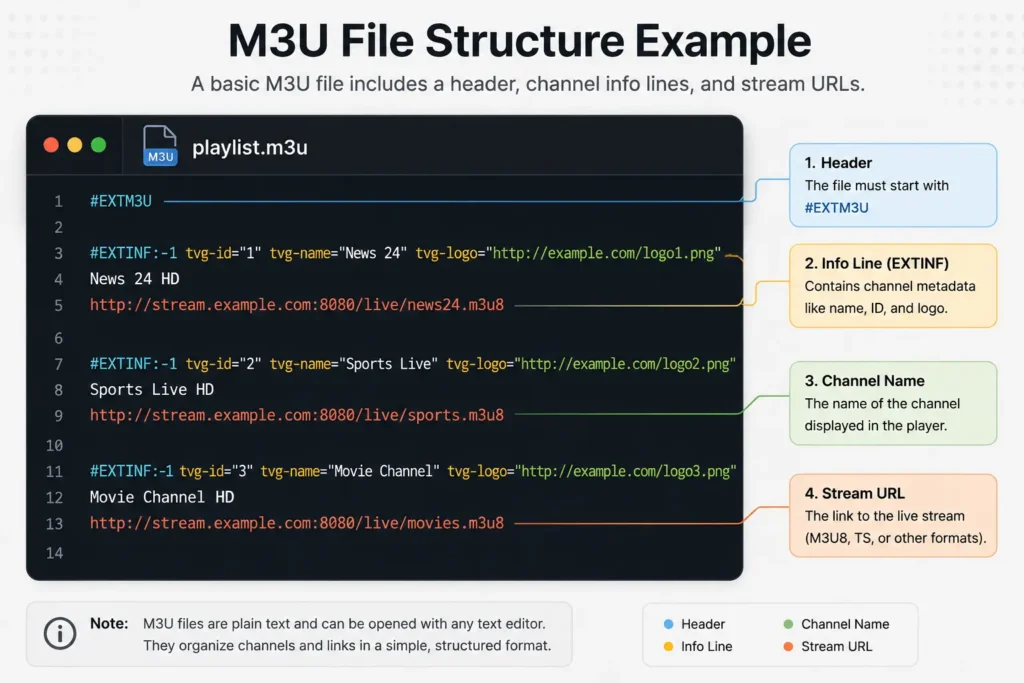
A basic M3U file follows a consistent pattern. Each entry generally includes:
A header line, #EXTM3U, marking the file as a valid M3U playlist
An info line for each entry, starting with #EXTINF, which can include the channel name, duration marker, and sometimes a logo or group name
A stream URL line, pointing to the actual video source the app should request
A simplified example of what a single playlist entry looks like:
#EXTINF:-1,Channel Name
http://example-stream-url.com/channel1
The #EXTINF line carries descriptive metadata, while the following line is the actual network address the IPTV app connects to when that channel is selected. A full playlist simply repeats this pattern for every channel included.
M3U VS M3U8: WHAT’S THE DIFFERENCE
Most modern IPTV services use M3U8 rather than the original M3U format, though many apps accept both.
M3U is the original plain text format, using basic ASCII encoding.
M3U8 is functionally the same format but explicitly uses UTF-8 character encoding, which allows for special characters, accented letters, and broader language support in channel names and metadata.
For most users, the practical difference is minimal — both formats serve the same purpose, and IPTV apps typically handle either without requiring the user to choose between them manually.
HOW IPTV APPS USE M3U PLAYLISTS
When an IPTV app requests a playlist, it performs a few consistent steps:
- It retrieves the M3U file, either from local storage or from a provided URL.
- It reads the file line by line, identifying each channel entry and its associated stream link.
- It builds a channel list inside the app interface, often organized into groups or categories if that metadata is included.
- When a user selects a channel, the app requests the corresponding stream URL and begins playback.
This is why a playlist update on the provider’s side can change what’s available in the app almost immediately, particularly when the playlist is loaded as a live URL rather than a static file.
LOADING A PLAYLIST: FILE VS URL
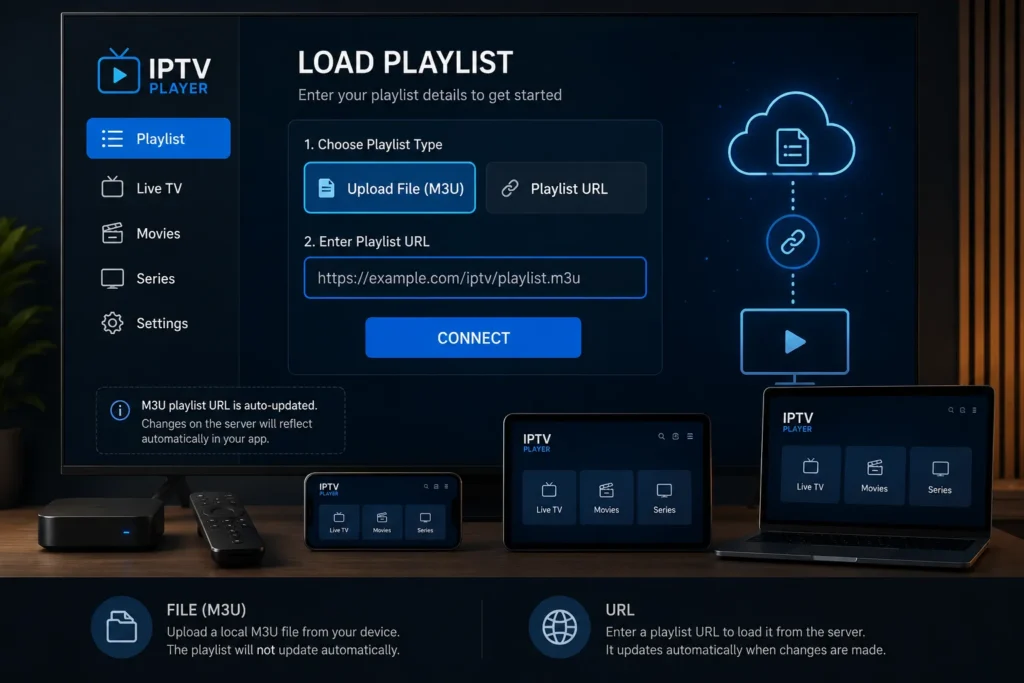
There are generally two ways to load an M3U playlist into an IPTV app:
Static file upload: The playlist is downloaded as a file and manually imported into the app. This version won’t update automatically — any channel changes require re-uploading a new file.
Playlist URL (M3U link): The app is given a web address that points to a live, hosted version of the playlist. Each time the app refreshes, it pulls the current version of the file, which means channel updates from the provider are reflected without any manual action needed.
Most IPTV services today rely on the URL method, since it allows providers to update channel lists without requiring users to reinstall or reconfigure anything.
COMMON M3U PLAYLIST PROBLEMS
A few recurring issues account for most playlist-related complaints:
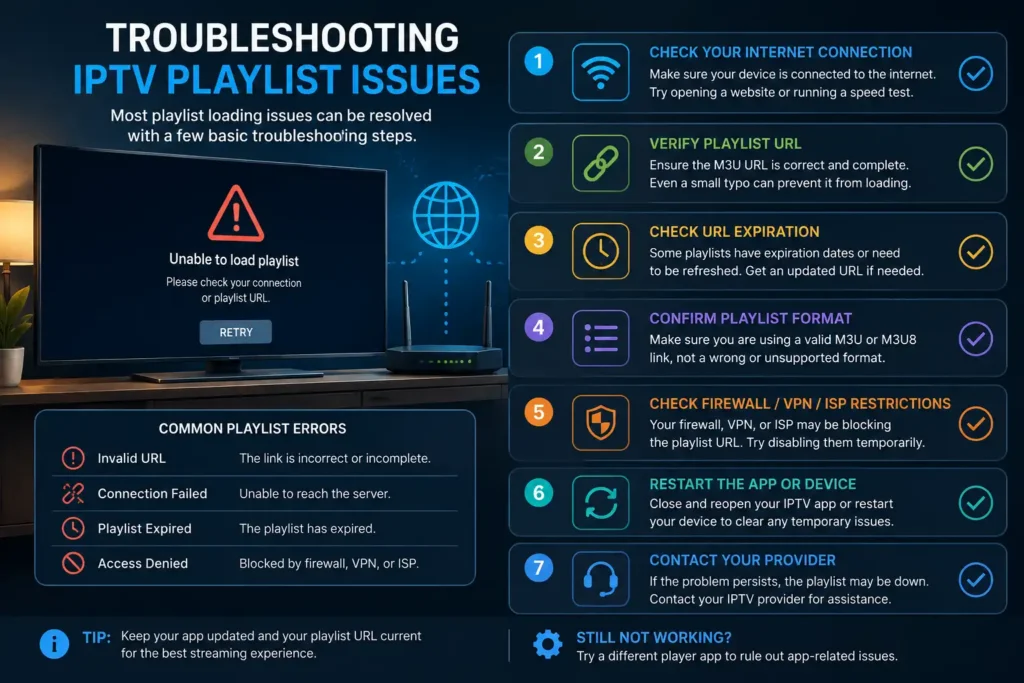
Expired or inactive links: If a playlist URL is no longer active, the app will fail to load any channels.
Incorrect file formatting: A playlist with formatting errors — such as a missing #EXTM3U header — may not be recognized correctly by the app.
Server-side outages: If the server hosting the stream sources is temporarily down, channels tied to that playlist won’t load, even if the playlist file itself is valid.
Outdated cached data: Some apps cache playlist data and don’t reflect updates until manually refreshed.
HOW TO TROUBLESHOOT A PLAYLIST THAT WON’T LOAD
If channels stop loading, a structured troubleshooting approach usually resolves the issue:
- Confirm the playlist URL or file is correct and hasn’t been changed.
- Check your internet connection, since a failed playlist load can sometimes be a connectivity issue rather than a playlist problem.
- Force-refresh the playlist inside the app, if that option is available.
- Restart the IPTV app completely, rather than just navigating back to the home screen.
- Reinstall the app if the issue persists after a refresh and restart, since corrupted local cache data can sometimes cause loading failures.
If none of these steps resolve the issue, the playlist source itself is likely temporarily unavailable, which typically requires contacting the provider.
M3U PLAYLISTS AND EPG DATA
Many IPTV setups pair an M3U playlist with a separate EPG (Electronic Program Guide) source, which provides schedule information — what’s airing now and what’s coming up next for each channel.
The M3U file and the EPG file serve different purposes: the M3U playlist tells the app which channels exist and how to stream them, while the EPG data adds the program schedule layered on top of that channel list. Not every IPTV app requires both, but having an EPG source significantly improves the viewing experience by adding a familiar guide-style interface.
PLAYLIST SECURITY AND SOURCE AWARENESS
Because M3U playlists are just text files pointing to stream URLs, it’s worth being cautious about where a playlist comes from. A playlist by itself doesn’t pose a security risk, but downloading files or apps from unverified sources can expose a device to unnecessary risk.
A few general safety practices worth following:
Only load playlists from sources you trust or have subscribed to directly.
Avoid installing third-party apps that request unusual device permissions unrelated to media playback.
Keep IPTV apps updated to their latest version to reduce exposure to known vulnerabilities.
Be cautious of playlists shared through unofficial forums or unverified channels, since the source and reliability of the underlying content cannot be confirmed.
This article covers the M3U format from a technical standpoint. The legitimacy of any specific playlist depends on whether its source has proper rights to distribute the content it references, and that should always be evaluated independently.
CONCLUSION
An M3U playlist is, at its core, a straightforward text file that tells an IPTV app which channels exist and where to find them. Understanding its structure — the header, the info lines, and the stream URLs — makes it much easier to troubleshoot loading issues and understand how channel updates actually reach an app.
Whether loaded as a static file or a live URL, the playlist format itself is just infrastructure; what matters most is the reliability and legitimacy of the source providing it. For setup walkthroughs on specific devices, the Kemo IPTV tutorials section covers the process in more detail.
FAQ
What does M3U stand for?
M3U stands for MPEG version 3.0 URL. It’s a plain text playlist format originally used for audio files, later adapted for video and live IPTV streaming.
What’s the difference between M3U and M3U8?
M3U8 is functionally the same format as M3U but uses UTF-8 encoding, allowing better support for special characters and broader language compatibility in channel names and metadata.
Why won’t my IPTV app load my M3U playlist?
This is usually caused by an expired playlist link, a temporary server outage, formatting errors in the file, or a connectivity issue. Refreshing the playlist or restarting the app resolves most cases.
Can I edit an M3U playlist myself?
Yes, since it’s a plain text file, it can technically be opened and edited with a text editor. However, formatting errors can prevent the app from reading it correctly, so edits should follow the standard M3U structure.
Do all IPTV apps use M3U playlists?
Most IPTV apps rely on M3U or M3U8 playlists as their standard channel-loading format, though the exact implementation can vary slightly between apps.
What is the difference between a playlist file and a playlist URL?
A playlist file is a static download that won’t update unless manually replaced. A playlist URL is a live link the app checks each time it refreshes, automatically reflecting any channel updates from the provider.
Is an M3U file the same as an EPG?
No. The M3U file lists channels and their stream sources, while the EPG (Electronic Program Guide) provides schedule information layered on top of those channels. They serve different but complementary purposes.
Can an M3U playlist contain a virus?
The M3U file itself is plain text and doesn’t execute code, so it cannot contain a virus in the traditional sense. Risk generally comes from the source distributing it or from unrelated app permissions, not the playlist format itself.
How often do M3U playlists update?
This depends entirely on the provider. Playlists loaded as a live URL can update as frequently as the provider pushes changes, while static files only update when manually replaced.
Why do some channels in my playlist not work while others do?
This is typically caused by individual stream sources being temporarily down, rather than an issue with the playlist file as a whole, since each channel entry points to its own separate stream URL.
INTERNAL LINKING RECOMMENDATIONS
“Kemo IPTV tutorials” → https://iptvsverige-4k.net/tutorials/ (used in conclusion, relevant for setup guidance)
“what IPTV is and how it works” → https://iptvsverige-4k.net/what-is-iptv-how-it-works/ (natural link for readers needing the foundational explanation before diving into playlist specifics)
Future article opportunities to strengthen this topic cluster:
What Is an EPG? Electronic Program Guides Explained
IPTV Buffering: Causes and Fixes
How to Install IPTV on Fire TV Stick
Choosing an IPTV Service Responsibly